Calling for help
- Stop somewhere accessible and sit in the driver seat of the vehicle that needs help. You must hold its keys. Keep bank money available for the service.
- Press K to open the vehicle panel. Use the Vehicle tab; if you have cycled to a job tab, continue cycling until Vehicle appears again.
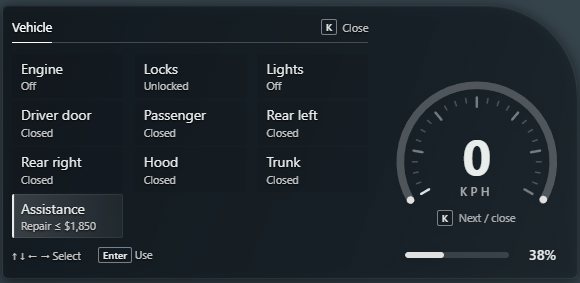
- Use the arrow keys to select Assistance. Repair shows the most a mechanic can charge for the recorded damage. If nothing needs repairing, Tow shows the call-out price instead.
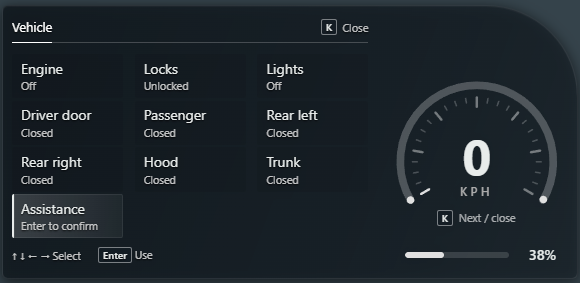
- Press Enter once and read the confirmation notification. Press Enter again on the same row within 5 seconds to send the call. If you change your mind, let the confirmation expire.
- Read the result notification. A successful call goes to on-duty mechanics, and Assistance changes to show progress. Backspace closes the vehicle panel; press K to check it again.
While help is on the way
- Waiting shows how long the call has been open. It is elapsed waiting time, not a promised arrival time.
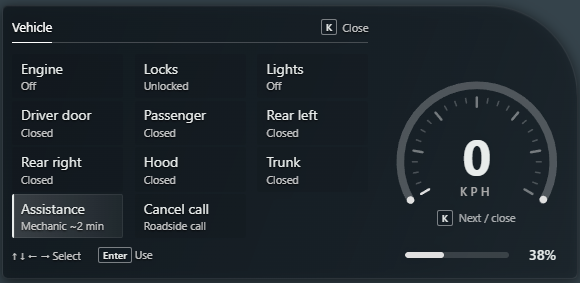
- When a mechanic accepts, a notification names them and gives a rough ETA. Assistance shows Mechanic followed by an estimated number of minutes, or Mechanic coming when an estimate is unavailable.
- Once the mechanic is near the vehicle, Assistance shows Bill with the amount so far. Enter on a progress row shows call details rather than sending another request.
- Stay with your vehicle and keep it accessible. The mechanic receives GPS to it. Coordinate with them when they arrive and give them room to carry out repairs or arrange a tow.
- Closing the panel does not cancel the call. You can get out and wait nearby; sit in the driver seat again to check Assistance. Roadside Assistance also sends phone texts when a mechanic accepts and when the call closes.
- If the assigned mechanic drops out or ends their shift, the call returns to the board. Read the notification and check the updated status.
Sending a roadside crew
- If no other mechanic is on duty, a crew is offered immediately for eligible repairs. Otherwise it becomes available after 5 minutes without a mechanic accepting.
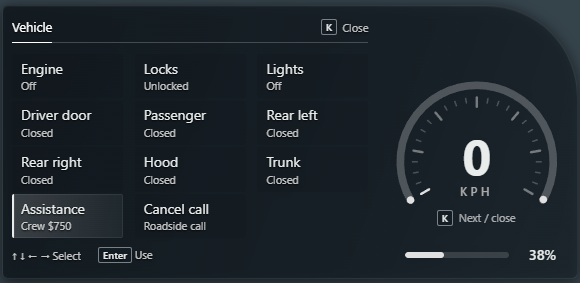
- When Assistance reads Crew followed by a price, select it and press Enter. Read the confirmation: the crew repairs engine, fuel tank and tyres, with no bodywork or towing.
- Press Enter again within 5 seconds to send the crew. Assistance changes to Crew in with a countdown, then Crew at work while repairs are attempted.
- Remain within 15 metres of your vehicle. Arrival takes 60–120 seconds. Keep enough money in your bank for the full crew charge and read the completion notification.
Charges and completion
- Calling a mechanic agrees to the maximum price displayed. The final mechanic charge includes a call-out fee plus the repairs they performed, up to that agreed maximum. The current maximum service bill is $5,000.
- When all damage recorded for the call is fixed, payment is taken automatically from Bank and the call closes. There is no invoice to accept or Pay button. A tow-only job completes when the mechanic drops the vehicle off.
- The Bill shown while the mechanic is nearby is the bill so far. Read the final notification for the amount actually charged, and check bank Recent activity to review the payment.
- Repairs you perform yourself are excluded from the mechanic repair charge, though the call-out fee still applies to a completed mechanic service. If your bank cannot cover the mechanic bill, the service takes the available balance and reports the shortfall.
- Crew payment also comes from Bank. Its full price must be affordable before the repair; a failed attempt to reach or repair the vehicle is refunded, with the result shown in the notification.
Cancelling or ending a call
- Return to the driver seat, open the Vehicle tab with K and select Cancel call when it is shown.
- Press Enter once, then Enter again within 5 seconds to confirm. Read Call cancelled before assuming the request has ended.
- If you still need help afterwards, wait for the cooldown shown by Assistance before calling again. The current cooldown is 90 seconds from your last call.
A call also closes if you log out, the vehicle disappears, it is repaired another way, or the call expires after 30 minutes. Cancellation is available while waiting, after acceptance or while the crew is travelling; it is unavailable once the crew is at work. Read the completion or cancellation message before making another request.
If you cannot request help
- No Assistance row: use the driver seat and the Vehicle tab. Passenger seats do not offer the request controls. Close other menus and reopen the panel with K.
- Need keys: you must hold the keys for this vehicle. Sitting inside it alone is not enough.
- Checking or Unavailable: allow a moment for the service to refresh and read any notification. The service may be restarting or temporarily unavailable.
- Call again with a timer: wait for the cooldown. Pressing Enter does not bypass it.
- No mechanics are on duty: basic repairs may still offer a crew, but bodywork and towing need a player mechanic. Check whether a repair kit or tyre kit can handle your problem.
- The price went up: read the refreshed price, then confirm again if you still want the service.