Know your repair kits
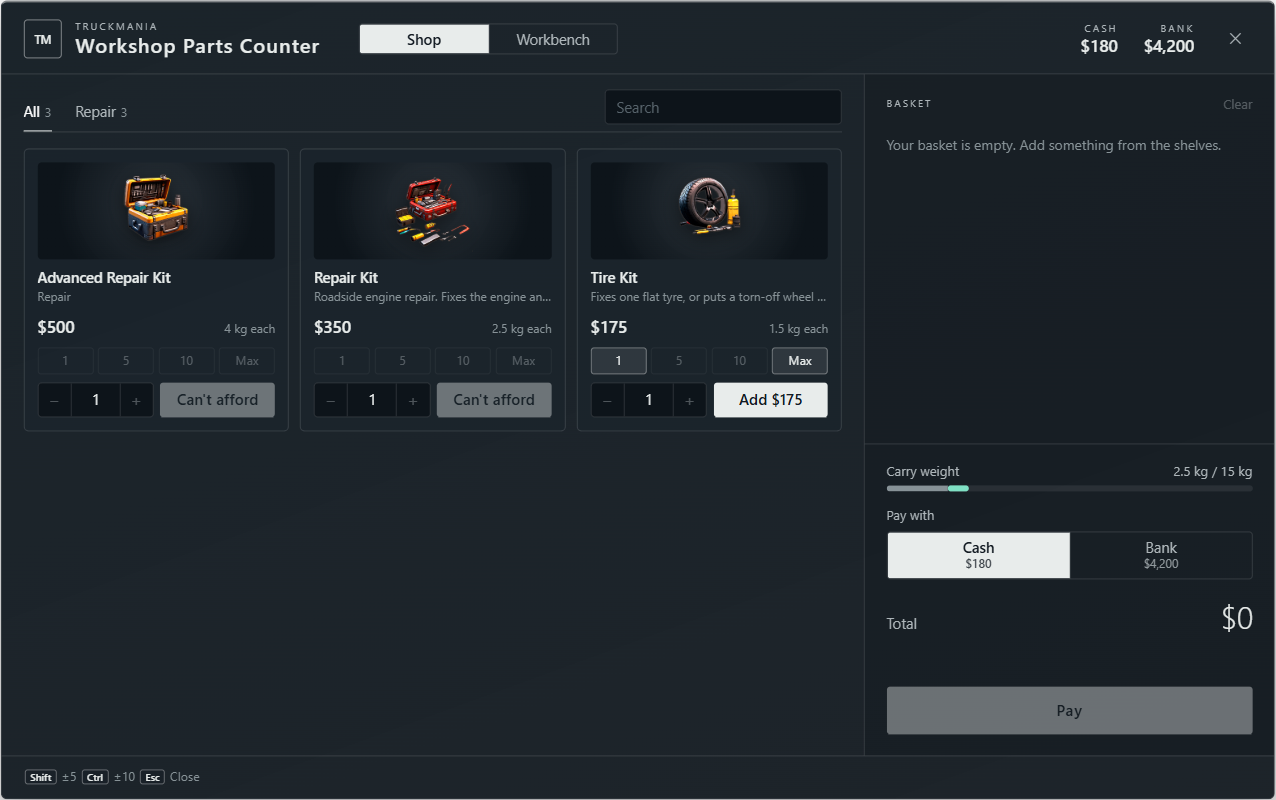
- Repair kit: repairs engine and fuel tank. Anyone can use it. For an on-duty mechanic it also restores body health, but leaves visible dents.
- Tyre kit: fixes the flat tyre or missing wheel you stand beside. Anyone can use it; one kit repairs one wheel.
- Advanced repair kit: repairs engine, fuel tank, bodywork and dents, plus all tyres and wheels. Only on-duty mechanics can use it.
Buy kits at the Workshop Parts Counter during a shift or craft them from scrap through its Workbench tab. Simple repair and tyre kits are also available at YouTool. A kit is consumed only when its repair finishes.
Repairing a vehicle
- Have the driver stop and keep the vehicle still. Get out of your own vehicle and identify the correct vehicle before using a kit.
- For a repair or advanced kit, stand close to the engine bay, usually at the front bumper. Some vehicles have a rear engine; follow the notification if it tells you to move.
- For a tyre kit, stand beside the damaged wheel. Open TAB and use the kit from your inventory.
- Remain close and wait for the repair progress circle to finish. If you cancel, move away or the vehicle cannot be controlled, check the notification and try again from a safe position.
Checking the result
For an assigned job, reopen Roadside and read the current damage and Still to fix. Engine includes fuel-tank work; bodywork and tyres may remain after a basic repair. The K-menu Roadside tab also shows the work remaining when you are on scene.
- Nothing for this kit to repair: choose the kit that matches the remaining damage. A tyre kit does not repair an engine.
- Stand at the engine bay: move to the correct end and closer to the bumper.
- Kneel next to a flat tyre: stand beside the actual damaged wheel.
- Could not work on this vehicle: ask the driver to stop, stay close and retry.
- Body health restored but dents remain: use an advanced repair kit while on duty if a full visual repair is needed.